
This option from the Check Book System Menu will dump transactions from your transaction history file. As transactions are processed, they are stored in the transaction history file. The file will keep accumulating until you take this option to remove the old transactions. You could let the transactions accumulate for years without wasting much space, but the more transactions you have in the history file, the slower your system will run. For this reason, we recommend you only retain about three years of activity
Also note that if you have indicated in your company information file that you are using the bank reconciliation feature, checks and deposits that have not cleared the bank will not be dumped. If you are not using the bank reconciliation feature, please indicate such in the company information file. This could cause your transactions to be retained forever.
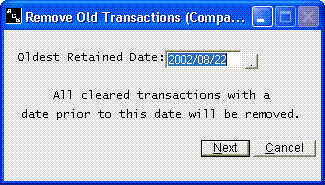
Any transactions older than the date entered will be dumped. You might consider making a backup immediately before removing these transactions.