
The customer record contains fields to hold the usage for the year. Each billing cycle the system adds the current usage to the year to date usage and stores this information in the customer record. At the end of each year, or maybe a fiscal year, you should run the Zero Year to Date Usage program to set the accumulated usage back to zero. It is easy to forget to do this.
If you did forget to run the Zero Year to Date Usage, you can run this Forgot to Zero Year to Date menu option at any time during the year and system will look through history and reconstruct the year to date usage.
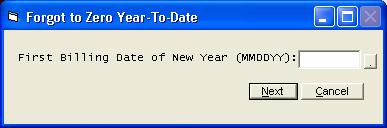
The system needs to know the first billing date of the current year in order to re-add the usage from the beginning of the year. Use the first billing date and not the first day of the year.